D&D 5e West Marches
Most communities on WestMarches.games play D&D 5e, and a new 5e community needs little setting up. It starts with the standard 5e experience ladder, and characters get Species and Class fields. For the campaign itself, see Running West Marches.
What's a session worth?
The 5e ladder says a character needs 300 XP for level 2 and 355,000 for level 20. It doesn't say how much a session is worth, and with several GMs that has to be written down, or one generous GM makes the rest look stingy.
Pay for time played and for how hard the adventure is, not for what the party fought. Nobody has to add up encounter XP after a long session, and a careful party earns as much as a reckless one. This table is based on the one from the West Marches I play in. For every 30 minutes played, everyone on the adventure earns the XP and gold for its tier. Round the time to the nearest half hour.
| Difficulty | Levels | XP | Gold |
|---|---|---|---|
| Tier 1 | 1–3 | 100 | 20 gp |
| Tier 2 | 2–5 | 200 | 50 gp |
| Tier 3 | 4–7 | 400 | 90 gp |
| Tier 4 | 6–9 | 500 | 150 gp |
| Tier 5 | 8–11 | 600 | 220 gp |
| Tier 6 | 9–14 | 800 | 350 gp |
| Tier 7 | 11–16 | 1,000 | 440 gp |
| Tier 8 | 13–18 | 1,200 | 700 gp |
| Tier 9 | 15–20 | 1,400 | 790 gp |
| Tier 10 | 17–20 | 1,600 | 1,000 gp |
So a three-hour tier 3 adventure pays each character 2,400 XP and 540 gp, and Distribute Rewards pays them all in one go. The Levels column is a suggested range for the adventure's Minimum Level and Maximum Level. The tiers overlap, so more characters can join each game.
Put the table on a GM-only World Wiki page, so every GM pays the same.
Link the D&D Beyond sheet
Players paste their D&D Beyond link into Character Sheet URL. The character page then shows the sheet's ability scores, Armor Class and max hit points.
It also warns when the levels don't match: "D&D Beyond sheet is level 7, but this character is level 6." The site levels a character from their XP, but the player levels the sheet by hand, and the two drift apart. Better to spot that on the character page than halfway through a fight.
The sheet has to be public. In D&D Beyond, set the character's privacy to Public (Campaign Only isn't enough, because the site isn't in your campaign). The site reads each sheet at most every five minutes, so a change can take that long to show up.
Who's at the table tonight?
At a home game you know the party. In a West Marches you might be running for five characters you've never seen, and next week it's a different five.
The DM screen puts them all on one page. Click DM Screen on the adventure and it opens in its own window, with a card for every approved player whose character links a D&D Beyond sheet. Each card has the numbers you'd otherwise ask the table for, from passive Perception and saves to spell save DCs and slots. It lists conditional advantages too, like advantage on saves against poison. Those are the ones everyone forgets.
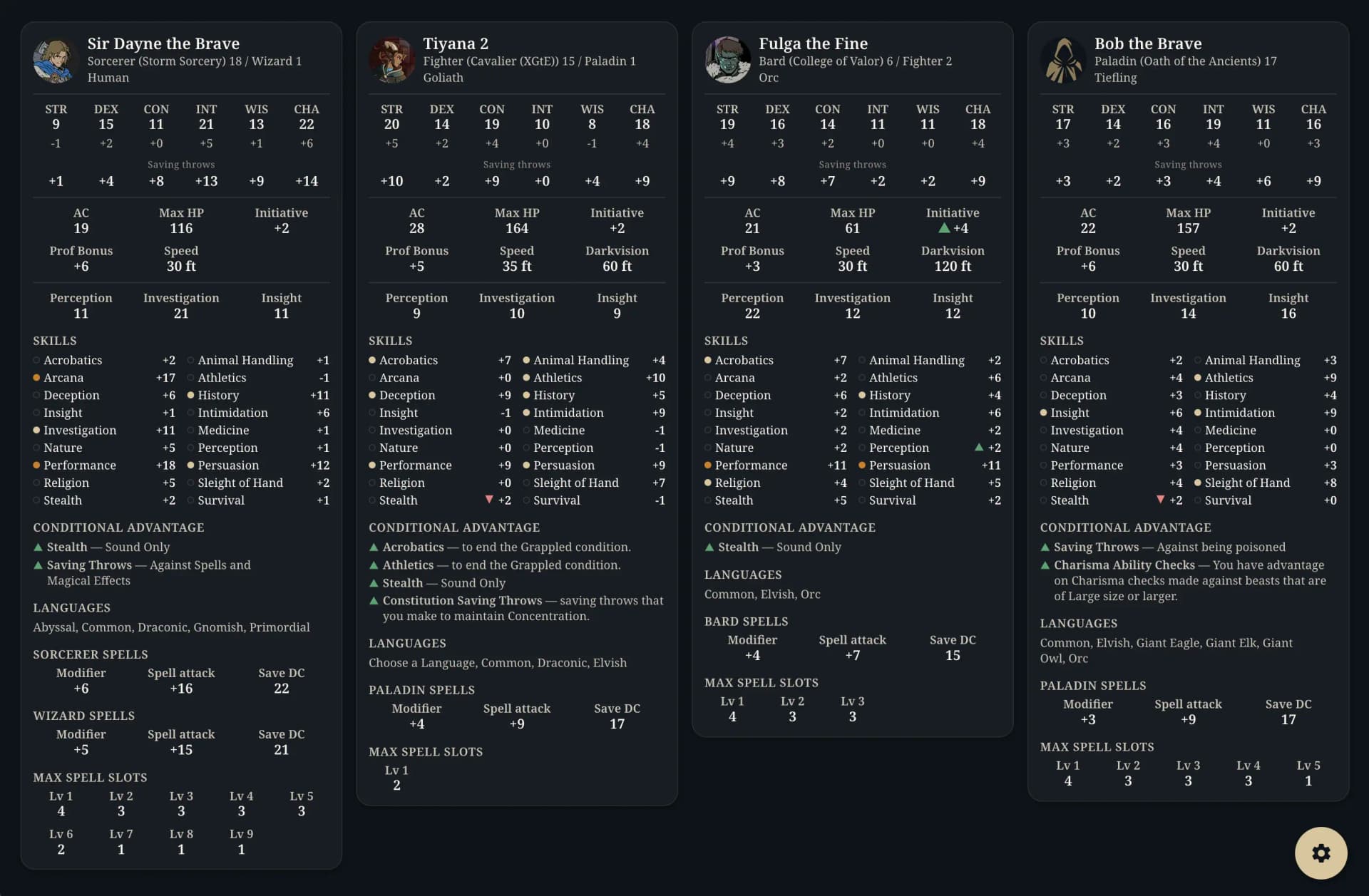
The gear button in the corner opens Display settings. There you can turn off the sections you never look at, hide a card, or add a sheet by its D&D Beyond link, like a sidekick the party picked up.
It doesn't track the fight, though. There are no current hit points, conditions or turn order, so keep your VTT or Avrae for that.
"I rolled an 18, honest"
Maybe they did. In a Discord full of strangers there's no way to tell whether that 18 was rolled or typed in, so let the site roll it.
Switch it on under Settings → Character Settings → Stat Rolling. The formula starts as 4d6kh3 (4d6, drop the lowest), rolled six times. Change it if your table plays 3d6 straight. These four decide how strict it is:
- Roll SetsHow many sets a player picks from. One is the strictest.
- ThresholdsSet a minimum total and nobody gets stuck with a row of 8s. A set that misses a threshold is rerolled before the player sees it.
- Roll ExpiryHow long the sets last. A player can't roll again until they make a character or the sets expire, so this is your reroll rule too.
- OptionalPlayers can skip the roll and use point buy or the standard array.
Players roll from the character form and pick a set. Making the character uses up the whole batch, including the sets they passed on. Until a GM approves the character, the player can still switch sets on the edit page, and after that it's locked. The Rolls tab on the character page shows the scores and every other set they got.
Pick a Stat & HP Rolls channel under Settings → Discord Notifications, and the bot posts every roll there. It edits the post later to show which set went to which character.
Hit points on level up
Hit point rolls need the Heroic community tier or higher.
5e lets a character roll their hit die on level up or take the fixed average. Rolling has the same problem as ability scores, since nobody saw that 10 on the d10. Hit Point Rolls, under Settings → Character Settings, give every character a slot for each level from 2 up on their Rolls tab. Level 1 has no slot, because 5e gives the full hit die there.
The player opens a slot, picks their hit die (the site doesn't track class) and does one of these:
- Roll it hereThe site rolls the die.
- Take the fixed average valued6 4, d8 5, d10 6, d12 7.
- Enter a value I already rolledFor a roll made somewhere else, like at the table or with a dice bot in Discord.
You choose in the settings whether players get the last two. Whichever they pick, the slot is locked, and only a GM or admin can correct it or clear it for a new roll. Rolls and averages post in the same Discord channel as stat rolls.
Switching this on mid-campaign gives every existing character empty slots for the levels they already have. Leave manual entry on while players fill in their old rolls, then turn it off if you want every new roll made on the site. GMs can enter values either way.
Nothing goes back to D&D Beyond, so players still copy the numbers into their sheet.