by Vee
•
Updated 16 days ago
TGFS DM Handbook
Previous Section: Guidelines
There is a link to the DM application in #server-information. This application has both mechanical and subjective questions. Applications may take a couple weeks to review.
You will get a ping in #announcements if your application is accepted, and you will be given the "New DM" and "All DMs" roles.
The next step is to set up your roll20 game for this server. You will need a pro or plus roll20 subscription to utilize the PC sheet import system. If you do not have these subscriptions, please post in #dm-requests, and our team can give you a roll20 game to utilize. Your game should be titled "TGFS, [Your name]"
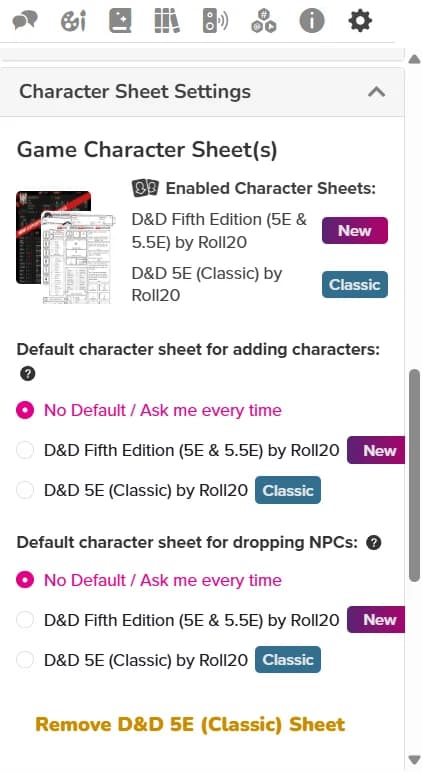
If you are creating your own roll20 game with your pro or plus roll20 subscription, your game must allow for BOTH classic and new 5e sheets. You can do this by:
You sheet settings after launching your game should look like this:
Tip! If you have never DM'd on Roll20, check out the Roll20 Interactive tutorial. Head over to Roll20 Home Page, hover over "Play" on the top banner, and select "Interactive Tutorial."
After you have your roll20 game set up, head over to the community home page on westmarches.games. You should now see an option at the bottom or right side of the screen that says "Edit GM Page".
Click it and you should be able to create your own page. Be sure to add a link to your roll20 game, and any table rules or helpful info players should know before playing in your games.
This page will be linked on our community home page, and on the discord post for any adventure you pick up.
To pick up an adventure to run, go to #adventure-listings or "Adventures" on westmarches.games to see what games are awaiting a DM. Try to prioritize older posted games first. Then, follow these steps:
Next Section: Picking up, Preparing, & Running Adventures
TGFS DM Handbook
Return to Table of Contents